
Sub-Total: RM0.00


Door and Gate Digital Lock Bundles: Double Security for Malaysian Homes
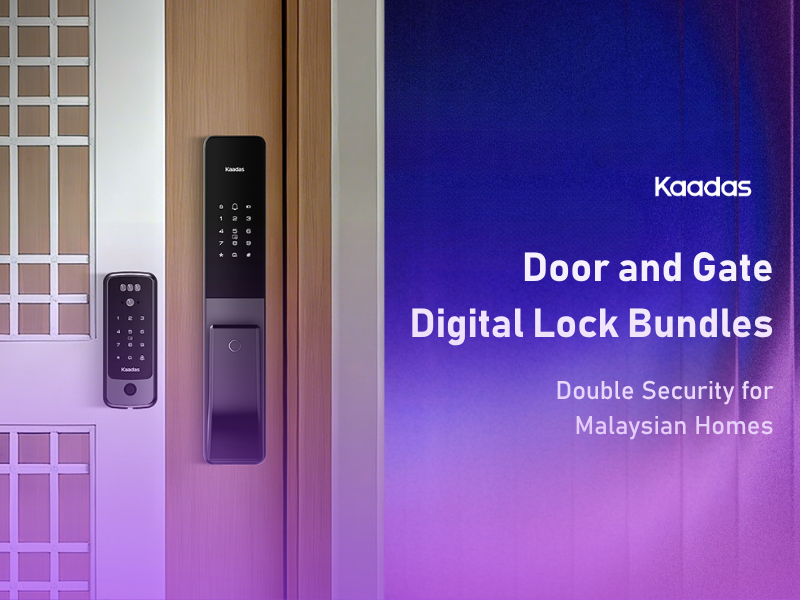
Every condo entrance in Malaysia has two barriers: the metal grille gate, then the main door. Most households run them as two separate routines. Unlock the gate, step through, unlock the door, step through, remember to lock both. Even with a digital lock on each, that is still two authentications every time anyone comes home.
Kaadas Dual Unlock turns them into one. A compatible gate lock is synced with a compatible main door lock, and a single authentication at the gate opens both. This guide explains how the sync works, which Kaadas models pair with each other, how to choose a pairing for your household, and where the door and gate bundles live on the Kaadas Malaysia site.
Why layered entry matters in a condo
The gate and the door do different jobs. The gate is the first barrier and the point where visitors, delivery riders and contractors stop. It is the natural place for verification, which is why the Kaadas R9KFV puts a camera, live monitoring and two-way communication on the gate rather than the door. The main door is the second barrier, with its own credentials and its own auto-lock, so that even someone who gets past the gate meets a locked door.
Two barriers only work if both are actually locked. When two locks are a nuisance, people leave one open: the gate propped for the delivery, the door on the latch because the gate is locked anyway. Dual Unlock removes the nuisance. One authentication opens both, both auto-lock behind you, and the entrance is always fully secured without anyone having to think about it.
How Dual Unlock works
Dual Unlock runs on a pairing module fitted inside each lock. When you authenticate at the gate, whether by fingerprint, PIN, card or face, the gate lock releases and sends a wireless signal to the main door lock so both open at the same time. You walk through both without stopping.
Each lock also keeps working on its own. If the sync is not triggered for any reason, the gate still opens with its own credential and the door still opens with its own fingerprint, PIN or key. Dual Unlock is a layer on top of two independent locks, not a replacement for either. Homeowners who prefer separate operations, for example while a contractor is working in the corridor, can switch the feature off and on again as needed.
Dual Unlock does not depend on WiFi. WiFi only comes into play for the app features of the WiFi models in the pairing.
Which Kaadas models pair
Dual Unlock needs a compatible lock on each side of the entrance.
Gate side: the Kaadas R8GD fingerprint gate lock and the Kaadas R9KFV face recognition gate lock. Both are described on their product pages as syncing with selected Kaadas door lock models.
Door side: the Kaadas Q15-5WK and Kaadas Q9 mortise locks, and the Kaadas R8 rim lock. The Kaadas R8L glass door lock also supports Dual Unlock for units where the inner door is glass. Both the Q15-5WK and Q9 product pages let you add an R8GD or R9KFV as a gate lock option when you order, which is the simplest way to buy a matched pair. Not every Kaadas door lock supports Dual Unlock, so if you already own a Kaadas lock and want to add a gate lock, check with the Kaadas team before ordering.
Recommended door and gate pairings
Prices move with promotions, so the current figures are on the product pages and the digital lock promotion page. The pairings below are ordered from simplest to most fully featured.
Value pairing: Kaadas R8 (door) + Kaadas R8GD (gate). Fingerprint, PIN code and RFID card at both the door and the gate, with fingerprint readers on both sides of the gate for keyless exit. Both locks run on four AA alkaline batteries and both use a Bluetooth connection, so there is nothing to add to your WiFi and nothing to recharge. This is the pairing for a household that wants a keyless, synced entrance without app management. One note: the R8 opens by fingerprint, PIN and card and does not list a mechanical key for entry, so its USB-C port and a power bank are the emergency route on the door side.
Connected pairing: Kaadas Q15-5WK (door) + Kaadas R8GD (gate). The Q15-5WK is a push-pull mortise lock with built-in WiFi. It brings the Kaadas Smart App to the door: temporary PINs for guests and service providers, access and alert logs, and doorbell alerts on your phone. The R8GD keeps the gate side simple and fingerprint-first. This is the pairing for households with domestic helpers, tenants or regular visitors who need managed access at the door, and a keyless gate in front of it. The Q15-5WK product page offers the R8GD as a bundle option.
Face-at-the-gate pairing: Kaadas Q15-5WK or Kaadas Q9 (door) + Kaadas R9KFV (gate). Here the gate does the verifying. The R9KFV’s 3D face recognition opens the gate hands-free, its 150-degree camera and two-way communication let you see and speak to visitors from the Kaadas Smart App, and remote unlock lets you open the gate for someone you are expecting while you are out. Pair it with the Q15-5WK for a WiFi door lock with fingerprint, PIN, card and app access, or step up to the Q9 for face recognition, finger vein and a camera on the door as well. Both door locks offer the R9KFV as a bundle option on their product pages. This is the pairing for households that want hands-free entry and want to know who is at the gate at all times.
For a closer look at the two gate locks themselves, see the metal gate digital lock guide.
Managing both locks in the Kaadas Smart App
What you can do from the app depends on which locks are in your pairing. The Q15-5WK, Q9 and R9KFV all have built-in WiFi and connect to the Kaadas Smart App directly, with no separate bridge. The R8 and R8GD use a Bluetooth connection and are managed at the lock rather than from the app.
Bundles and promotions
Kaadas Malaysia sells door and gate pairings as Dual Unlock bundles. You can browse them on the Dual Unlocking Bundle page, or add a gate lock directly from the Q15-5WK or Q9 product page using the gate lock option there. Current bundle pricing and any running promotions are on the digital lock promotion page.
Buying as a bundle means one installation appointment for both locks rather than two visits, and the two locks are configured and tested together. Every Kaadas lock comes with a two-year onsite warranty covering labour, transport and parts within the Klang Valley, extendable to a third year, and the extension can be taken out for the bundle as a whole. Delivery and installation are included when you buy from Kaadas Malaysia.
Installation: what to expect
A Dual Unlock installation can be done in a single visit. The technician fits the gate lock and the door lock, pairs and configures the dual unlock synchronisation and tests it, and enrols your household’s fingerprints, faces, PINs and cards before leaving.
Before the visit, the Kaadas team assesses your gate and door. The clearance between the gate and the main door matters for the two lock bodies, and the installer confirms it during the assessment. A Door Assessment Guide is linked from each product page if you want to check your entrance in advance.
If your pairing includes a WiFi lock, the installer also checks that your home WiFi reaches the door and, for the R9KFV, the gate.
Frequently asked questions
Does one fingerprint open both the gate and the door?
Yes. On a supported pairing, a single authentication at the gate opens both the gate lock and the main door lock together.
Do I need WiFi for Dual Unlock?
No. Each lock has its own pairing module, and the two modules talk to each other directly rather than over your WiFi. WiFi is only needed for the app features of the WiFi models (the Q15-5WK, Q9 and R9KFV).
What if one lock’s battery runs out?
Each lock has its own low-battery warning and its own USB-C emergency power port, and the mortise door locks also come with mechanical keys. Each lock also works independently, so a flat battery on one does not lock the other.
Can I add a gate lock to my existing Kaadas door lock later?
If your door lock is one of the Dual Unlock models, yes. The Kaadas team confirms compatibility, then fits the gate lock and sets up the sync in one visit. Contact Kaadas before buying to check your model.
Is a bundle cheaper than buying the two locks separately?
Bundle pricing and current promotions are on the Dual Unlocking Bundle and digital lock promotion pages. A bundle also means a single installation appointment for both locks.
Can I turn Dual Unlock off?
Yes. Homeowners can disable the feature when they want the gate and door to operate separately, and enable it again afterwards.
Building out a full condo entrance? Start with the gate lock range, read up on choosing a metal gate lock, and see the wider list of condo digital lock features worth having.