
Sub-Total: RM0.00


How Often to Change Digital Lock Batteries in Malaysia: A Complete Guide
One of the most common questions Malaysian homeowners ask after installing a digital lock in Malaysia is: “How often do I need to change the batteries?”
If you’ve been browsing forums or Reddit threads, you’ve probably seen conflicting answers. Some say their batteries last a year; others complain of changing them every few months. The truth is, battery life depends on several factors—and understanding them can save you from unexpected lockouts.
How Long Do Digital Lock Batteries Typically Last?
For most standard digital door locks using alkaline batteries, you can expect a lifespan of 6 to 12 months. However, this range varies significantly based on:
- Frequency of use: A busy family of five opening the door 20+ times daily will drain batteries faster than a single occupant.
- Features activated: Advanced features like digital lock with WiFi, face recognition, HD camera monitoring, and app connectivity naturally demand more power—but with smart optimisation, a reliable high-capacity battery keeps everything running seamlessly.
- Weather conditions: Extreme heat or humidity can affect battery performance, something to consider in Malaysia’s tropical climate.
The Kaadas Advantage: Rechargeable Lithium Battery Models
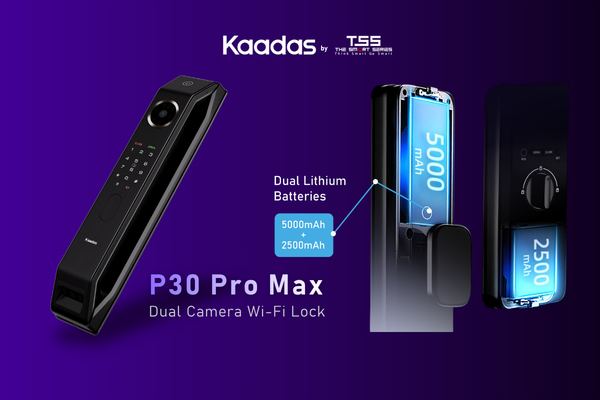
For homeowners who want even longer intervals between charges, Kaadas offers advanced models like the Kaadas P30 Pro Max featuring built-in rechargeable lithium batteries. These high-capacity power sources are engineered to last longer than standard alkaline batteries, requiring only two charges per year.
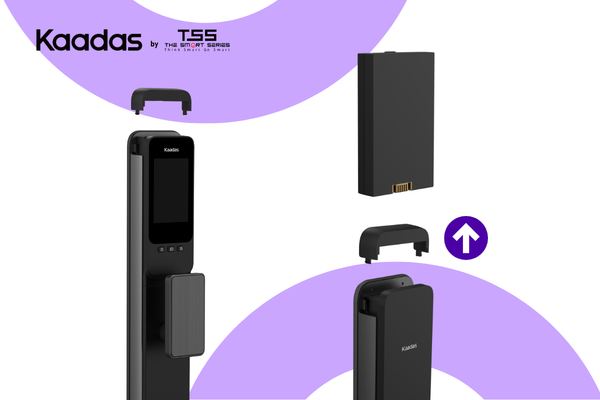
The P30 Pro Max takes convenience a step further with a dual rechargeable battery system. While one battery powers your lock, the other can be charged separately. This means zero downtime—you never have to remove the only power source and leave your lock vulnerable. Simply swap the charged battery in and continue with your day.
When charging, it’s best to do so during evening hours when family members are home. Even while the lock is powered down for charging, the mechanical override ensures you can still exit manually from inside in case of emergency—complete peace of mind.
Clear Signs Your Digital Lock Batteries Are Running Low
Modern smart locks give you plenty of warning before they run flat. Watch for these indicators:
- Audible alerts: A distinct beeping sound when you unlock or lock the door
- Visual indicators: Flashing red lights or dimming keypad response
- App notifications: The Kaadas app sends push alerts when battery levels drop below a critical threshold
- Slower response time: If your fingerprint sensor or motor seems sluggish, it’s time to replace batteries
How to Replace Digital Lock Batteries
Kaadas models that use standard AA alkaline batteries are housed behind the interior cover. Here’s the simple process:
- Locate the interior battery compartment (usually behind the handle or a dedicated cover)
- Remove old batteries and dispose of them responsibly
- Insert fresh batteries, ensuring correct polarity
- Test the lock a few times to confirm normal operation
For rechargeable lithium models like the P30 Pro Max, K70SE and K20 Pro Max, simply remove the lithium battery from the compartment and connect to a USB-C cable for 3–4 hours.
Emergency Power-Up: When Batteries Die Completely
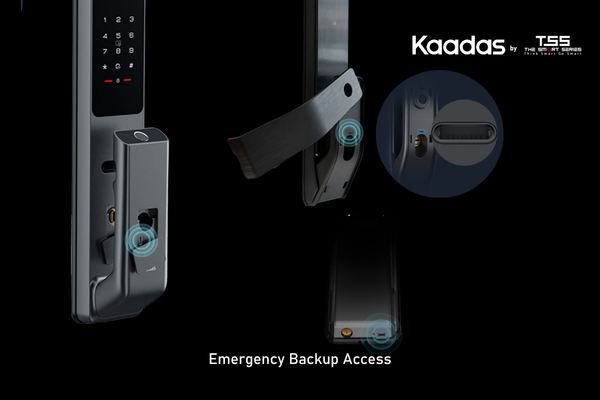
If your lock does run flat before you can replace batteries, don’t panic. All Kaadas digital locks come with emergency backup options:
- Power bank charging: Most models have an external USB port—usually on the exterior keypad—that accepts a standard power bank. This provides temporary power to unlock your door.
- Mechanical key override: Every Kaadas lock includes physical keys stored in a discreet location on the lock body. Keep a spare in your car or with a trusted neighbour.
Important: Power Outages Won’t Affect Your Digital Lock
A common myth is that digital locks stop working during blackouts. This is not true for battery-powered smart locks. Since your Kaadas lock operates independently of your home’s electrical system, it remains fully functional even during Tenaga Nasional Berhad (TNB) power interruptions. The only thing affected would be WiFi connectivity if your router loses power—but the lock itself continues to work with fingerprint, PIN, and mechanical key access.
Tips to Extend Battery Life
- Use high-quality alkaline or lithium batteries (avoid budget brands)
- Reduce unnecessary WiFi activity if you’re away for extended periods
- Keep your lock firmware updated for optimal power management
- Consider rechargeable models if you prefer fewer battery changes
Ready to explore digital lock with WiFi options or want to browse our lock models? Kaadas Malaysia offers a range of power-efficient smart locks designed for Malaysian homes. Visit our showroom or contact our team to find the perfect fit for your lifestyle.