

Sub-Total: RM0.00


Battery Dead? Here’s How to Open a Digital Lock in an Emergency
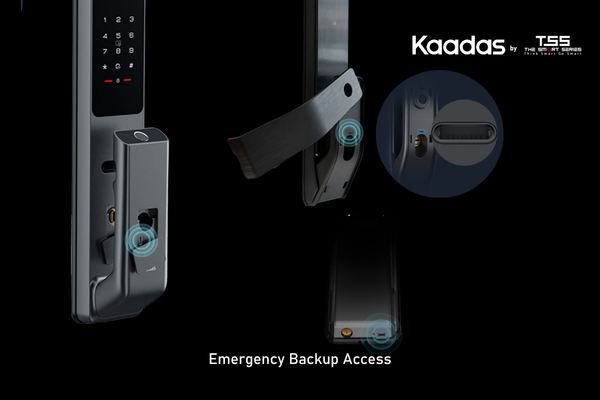
It’s the scenario every digital lock owner dreads: you return home after a long day, place your finger on the sensor or key in your PIN, and… nothing happens. The keypad is dark. The lock doesn’t respond. Your heart sinks as you realise—the batteries are dead.
First, don’t panic. Every Kaadas digital lock is designed with multiple backup methods to get you back inside quickly. Here’s your step-by-step guide.
How to Know You’re Running Low (Before It Happens)
The best emergency is the one you prevent. Kaadas locks give you several warnings before batteries run completely flat:
- Audible alerts: A series of beeps or voice alert when you lock or unlock signals low battery
- Visual indicators: Flashing red lights or dimming keypad illumination
- App notifications: The Kaadas mobile app sends push alerts when battery levels drop to critical thresholds, giving you days of advance notice
If you see or hear any of these signs, replace or recharge your batteries immediately—don’t wait for “just one more day.”
Emergency Method #1: Power Bank Boost
Most Kaadas digital locks feature an external USB port—typically located on the bottom edge of the exterior keypad—that accepts standard USB power sources.
What you’ll need: Any portable power bank with a Micro USB or USB-C output and a compatible cable.
How to do it:
- Locate the USB port on your lock’s exterior keypad (usually covered by a small rubber flap)
- Connect your power bank using the appropriate cable
- The keypad should light up immediately, providing temporary power
- Unlock using your face, fingerprint, PIN code, or RFID card as usual
- Once inside, replace or recharge the internal batteries
This method gives you enough power for multiple unlocks, so you can enter comfortably without rushing.
Emergency Method #2: Mechanical Key Override
Every Kaadas lock comes with physical mechanical keys that work independently of the electronic system. These keys are your ultimate failsafe.
Locating the keyhole: The mechanical key cylinder is discreetly placed on the exterior lock body, often hidden beneath a small cover or integrated into the keypad design.
Important: Keep at least one mechanical key outside your home—in your car, with a trusted family member, or in your office drawer. A key stored inside a dead lock is no help at all.
Emergency Method #3: What If You’re Already Inside and Need to Exit?
If the batteries die while you’re home and you need to leave, most Kaadas locks allow you to exit manually even without power. The interior handle typically operates mechanically, allowing you to turn the latch and exit freely.
For models with electronic interior handles, there’s usually a manual release button or lever. Check your lock’s user manual for the specific location.
Why This Happens (And How to Prevent It)
Rechargeable Lithium Battery Models
If you own a Kaadas model with rechargeable lithium batteries—such as the P30 Pro Max—battery management works differently. These locks give you even more visibility into power levels through the app, and charging is as simple as connecting a USB-C cable.
Because these batteries are designed for longevity, they typically need charging only twice a year. For models with dual rechargeable batteries, one powers the lock while the other charges separately, ensuring you never face a dead battery scenario if you maintain the spare.
Regular Battery Models
For models using standard AA alkaline batteries:
- Replace all batteries at the same time—mixing old and new reduces overall lifespan
- Use high-quality alkaline or lithium batteries (avoid budget brands that may leak)
- Mark replacement dates on your calendar every 6–8 months as a proactive measure
Important Safety Note
Never attempt to force your lock open, disassemble the keypad, or use tools to pry the mechanism. This can permanently damage your lock and void your warranty. The emergency methods described above are specifically designed to be safe, simple, and effective.
Still Stuck? Call Kaadas Support
If you’ve tried both emergency methods and still can’t gain entry, Kaadas Malaysia offers professional support:
- Sales inquiry: +60 18-235 2688 (William), +60 18-283 5688 (Shafiq), +60 18-357 5688 (Amir)
- Email: [email protected]
Our technicians can arrange emergency assistance to help you regain access without damaging your lock.
Peace of Mind in Every Lock
A dead battery scenario is rare when you pay attention to the alerts your lock provides. With proper maintenance, you’ll enjoy years of reliable service from your Kaadas fingerprint digital door lock models. And when the unexpected does happen, you now have a clear plan to get back inside.
For more guidance on keeping your smart lock in top condition, check out our guide on preparing for installation—it covers everything from door compatibility to long-term maintenance tips.